

Description
Download Bulk Resize Photos – Image Resizing Tool
Overview
Bulk Resize Photos is a desktop application designed to simplify the process of reducing image file sizes without compromising visual quality. The software enables users to quickly resize multiple photos at once, making it ideal for individuals and professionals who manage large volumes of digital images. Whether preparing photos for email, social media, or web publishing, this tool streamlines the workflow by eliminating the need for manual adjustments. It supports drag-and-drop functionality, allowing users to simply place images into the application window to initiate resizing with minimal effort.
Target users include photographers, content creators, small business owners, and anyone who regularly handles image files. The software is particularly beneficial for those who prioritize privacy and data security, as all processing occurs locally on the user’s device. Unlike cloud-based alternatives, no images are uploaded or stored externally. The developer, SoftPas, has positioned this tool as a lightweight, efficient solution for offline image optimization. Real-world use cases include batch processing before uploading to websites, reducing email attachment sizes, or preparing images for portfolio presentations.
Key Features & Capabilities
- Batch Image Resizing: Process multiple photos simultaneously with consistent settings, saving significant time compared to individual resizing.
- Drag-and-Drop Interface: Intuitive workflow where users can drag image files directly into the application window to begin processing.
- Local Processing: All image manipulation occurs on the user’s computer—no data is sent to external servers or cloud platforms.
- Fast Processing Speed: Under typical conditions, the software can resize approximately 150 images per minute, with performance potentially higher depending on system specifications.
- Offline Operation: Fully functional without an internet connection after initial setup, ensuring accessibility in any environment.
- Flexible Output Options: Supports various image formats and allows users to define custom dimensions, quality levels, and file naming conventions.
These features are especially useful when preparing images for online platforms with strict file size limits. For example, a content creator can resize 500 images for a blog post in under five minutes. Similarly, a small business owner can standardize product photos across multiple e-commerce listings efficiently. The ability to maintain control over output settings ensures consistent branding and optimized loading speeds.
User Interface, Workflow & Performance
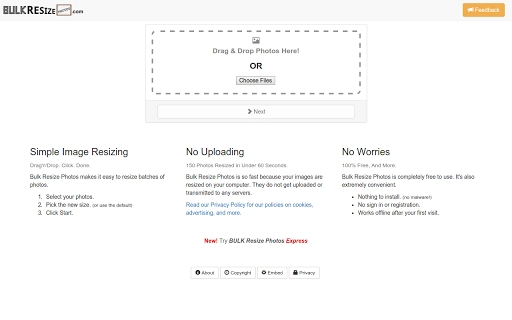
The user interface of Bulk Resize Photos is clean and minimalistic, designed for straightforward navigation. The main window features a central drop zone for images, with clear controls for setting output parameters such as dimensions, quality, and format. Menus are logically organized, and essential functions are accessible within a few clicks. The workflow is highly efficient: users drag files into the app, adjust settings, and start the batch process with a single button press.
Performance is optimized for speed and responsiveness. The software leverages local processing to deliver rapid results, with reported throughput of up to 150 images per minute under standard conditions. The developer did not specify resource usage details, but the 10.5 MB installation size suggests a lightweight footprint. Stability appears strong, as the application runs without requiring constant internet access and maintains performance across multiple sessions. General software behavior patterns indicate efficient CPU and RAM utilization, though exact metrics were not provided.
Compatibility & System Requirements
Bulk Resize Photos is compatible with both Windows and Mac operating systems, supporting modern versions of each platform. The software is available as a desktop application with a file size of 10.5 MB, making it quick to download and install. The developer did not provide additional system requirements, so users should ensure their devices meet basic standards for running desktop applications. Compatibility information was partially provided, with no mention of specific hardware specifications or minimum processor/memory thresholds.
Given its lightweight design and offline functionality, the tool is expected to perform well on mid-range machines. However, exact performance may vary based on the number of images processed, their original resolution, and the user’s hardware configuration. Users should verify that their system supports the installation of third-party desktop software, especially on managed or restricted networks.
Pros and Cons
Pros
- Fast batch resizing with up to 150 images per minute
- 100% local processing—no cloud uploads or data sharing
- Simple drag-and-drop interface suitable for beginners
- Works completely offline after initial setup
- Free to download and use with no hidden costs
Cons
- Exact system requirements were not listed
- No built-in preview feature for resized images
- Limited customization options for advanced users
- Only supports Windows and Mac—no Linux or mobile versions
- Version 1.0 suggests a new release with potential for future updates
FAQ Section
Is Bulk Resize Photos safe to use?
Yes, the software is designed with privacy in mind. All image processing is performed locally on your computer, and no files are uploaded to external servers.
Can I use Bulk Resize Photos without an internet connection?
Yes, after the initial launch, the application operates fully offline, making it suitable for use in environments without internet access.
What operating systems does it support?
Bulk Resize Photos is compatible with both Windows and Mac operating systems.
Is the software free to download and use?
Yes, the software is available at no cost. There are no subscription fees or premium tiers.
How often are updates released?
While update frequency is not specified, the software is currently at version 1.0, indicating it is in active development and may receive future improvements.
Final Thoughts + CTA
Bulk Resize Photos delivers a focused, efficient solution for users needing to reduce image file sizes quickly and securely. Its drag-and-drop interface, local processing, and offline functionality make it a standout choice among image resizing tools. While it lacks some advanced features like preview options or extensive customization, its core purpose is executed flawlessly. The free price point enhances its accessibility, making it ideal for students, freelancers, and small teams managing image workflows. For anyone seeking a reliable, private, and fast way to resize multiple photos, this tool is a solid choice. Download Bulk Resize Photos now.
Guides & Tutorials for Bulk Resize Photos App for Chrome
How to install Bulk Resize Photos App for Chrome
- Click the Preview / Download button above.
- Once redirected, accept the terms and click Install.
- Wait for the Bulk Resize Photos App for Chrome download to finish on your device.
How to use Bulk Resize Photos App for Chrome
This software is primarily used for its core features described above. Open the app after installation to explore its capabilities.
User Reviews for Bulk Resize Photos App for Chrome 0
No reviews found





